I’ve been playing around with using inexpensive internet devices as displays for transit arrival information, looking for something that will scale inexpensively. I’ve been having some fun with WiFi picture frames, but haven’t found one with quite the right features yet.
I’ve had slightly more success with a gadget called a ‘Chumby‘. Here’s mine sitting on my desk, next to my iPhone to give a sense of scale:
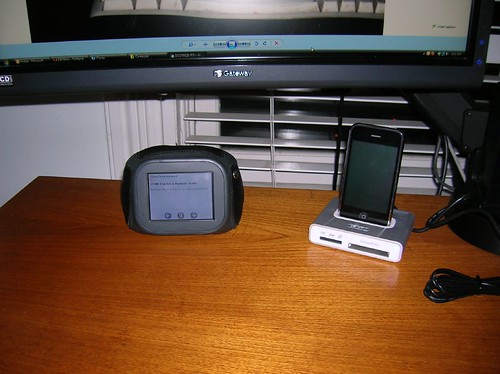
|
It actually uses an RSS Reader application as the display tool (I’ve prototyped delivering Transit Surfer™ as an Atom feed). It alternates between a minute displaying arrival times and 15 seconds displaying a clock (this is a hack to force the RSS Reader to re-load the feed). Here’s a software simulation of what’s on the screen (my Chumby is black, but they do come in colors):
The font size is a bit smaller than I’d like, but it’s still probably effective for someone like a receptionist who might want to give out bus or rail times to customers. But at $179 each, I don’t expect these to show up all over the place.
16 responses to “Desktop Transit Info Appliance”
I’ve actually suggested something similar to this…
Many bus stops are currently located near businesses, but don’t have convenient network access or power access, or the expense is difficult to justify based on stop ridership.
However, information displays (any old computer and a monitor, really) can be set up just inside windows of businesses near bus stops, given a reliable network connection and the right web interface. The businesses could even co-brand the displays with logos or promotions… given what some businesses pay to “capture eyeballs”, it could be a win-win situation for both riders and retailers.
I would love to have an atom feed for transit surfer; for regular commuters, I guess a feed per line per direction would be sufficient?
It would also be nice to have an SMS interface, either to transit surfer or the transit tracker phone service.
We have a couple of options for SMS via 3rd party services. See http://portlandtransport.com/archives/2007/08/transit_arrival_1.html for discussion.
The atom feed should be considered experimental, but there are two forms:
http://tsrf.us/cgi-bin/atom.pl?stop=8899
for using with an individual stop
or
http://tsrf.us/cgi-bin/atom.pl?id=goodsaminbound
for using with a choice set id (same choice sets we use with the transit board).
I use an extremely high-tech device to figure out/estimate when my bus is coming.
It’s called a printed schedule.
100% recyclable, biodegradable, and easy to replace if one gets lost, wet, or worn out. :)
(Jason takes a look at his printed transit info. loss from this morning’s downpour…)
Anyone know if the Pioneer Courthouse Square office still has any of the current printed system maps?
Jason Barbour Says:
It’s called a printed schedule.
Luddite. Why do you hate electricity?
Anyone know if the Pioneer Courthouse Square office still has any of the current printed system maps?
Yes. And yes, they do.
Feh. I eschew such trappings of modern technology, these products of your “paper mills” and “printing presses.” Instead, I rely entirely on the ancient verbal tradition of transit arrival times. Grandma, tell me again what time the 14 Hawthorne comes?
Actually, I’m holding out for the application that shows you a real-time Google map view, with little GPS-tracked bus icons converging on your location.
With VR goggles.
I like my chumby I use it as a high tech alarm clock that reads me my email and reminds me of when homework projects are due.
I like Transit Surfer because it gives me real time arrivals information for multiple stops.
information displays…can be set up just inside windows of businesses near bus stops
I know that the Streetcar arrivals board at the PSU Urban Center stop is located in the Pizzacato window, and I’ve seen a Transit Tracker display (probably consisting of a standard PC) inside the Washington Square Mall. In addition, someone mentioned here that there are arrivals displays inside the Kaiser clinics on Interstate.
Overall, you could use some really old computer since all it would be doing is displaying a Web page, or hook up the monitor to an existing server as a 2nd desktop.
Yes, the trick is to create an application (probably in Javascript) which updates the desired web page smoothly, and gracefully handles network downtime (doesn’t display a cryptic error message but removes the displayed arrival times), and restarts itself without any intervention whatsoever. Aside from the initial installation and network setup, this should require zero effort on the part of the business — if it’s easy and reliable, it can become widespread.
You could even envision an organization like Free Geek providing transit arrival displays for retirement communities, apartment complexes, etc.
That’s a pretty good description of what Transit Board does. Not sure how well it does on the ‘restarts itself’ front :-)
And in fact pretty soon I’m going to be telling you about some Free Geek boxes used for just this purpose…
A cell phone and a call to 238-ride is the best way to find out when your bus is coming.
Jason, do you really find the schedules accurate?
i’m seeking a tiny application that lives in a corner of my desktop thats always on and tells me when the streetcar will arrive at my local stop. i live right on the line and would like to know fairly instantly when i can run to catch it. or even a little icon i can run my cursor over in the bottom right corner of the screen by the clock that pops up with arrival times (PC comp).
If you can find an RSS reader widget that updates frequently (i.e., like once a minute), the RSS feed would do that.
Alternately, you could run the Transit Surfer in a very small browser window.
I think NextBus also has some widgets if Streetcar is your only interest.
i seem to only see these for mac, i know very little about these widgets, where do i find the rss feed for nextbus?
a streetcar/#77 arrival time reader board would be great in the new safeway in the pearl, is there some way for major businesses to get readerboards? afterall if you just miss the streetcar you can get a coffee at the store’s starbucks and sit by the fireplace and piano while you wait for the next one to arrive.
All it takes is a PC with internet access (any flavor of OS) and a big screen and we can put up a Transit Board.